Basic Thresholding
Basic Thresholding turns a greyscale scan into a binary image of pore and solid with one threshold, chosen automatically. Use it when the pores and the solid have clearly different grey levels; for scans a single threshold can't separate, use Interactive Segmentation.
- Find it Tools › Segmentation › Basic Thresholding
- Needs a greyscale 3D image
- Returns a new binary image at the source's size and voxel size; the greyscale source is unchanged
- Runs on CPU
- Science Basic Thresholding
Run it
- Open Tools, then Segmentation, and select Basic Thresholding. You can also start from an image's page, which fills in the image for you.
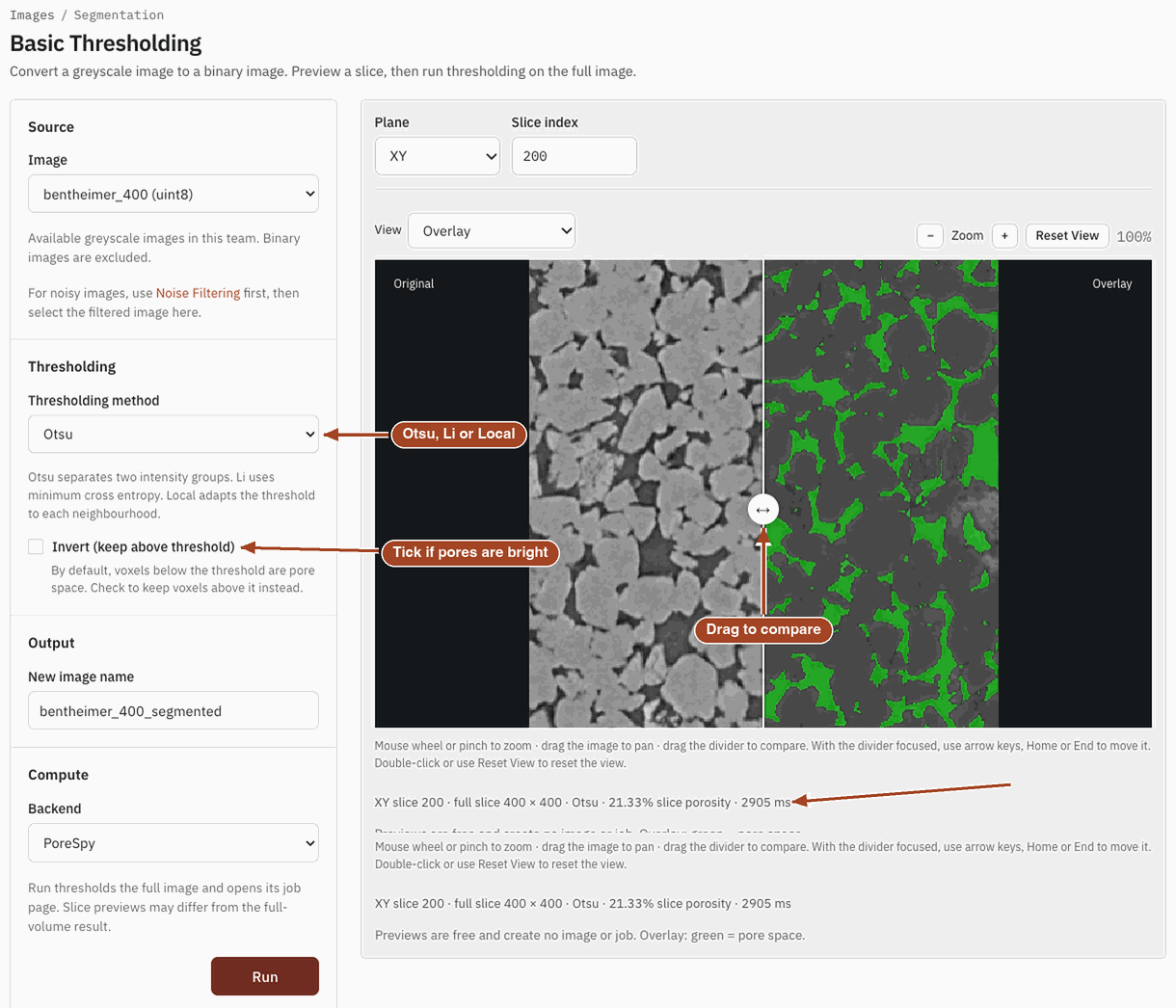
- Under Source, choose the Image. Only greyscale images are listed; images that are already binary are left out.
- Under Thresholding, pick the Thresholding method. With Local (Adaptive), set the Block size too.
- Tick Invert (keep above threshold) if your pores are brighter than the solid.
- Check the preview on the right. It shows one complete slice and updates as you change the settings; pick the Plane (XY, XZ or YZ) and the Slice index above it, and drag the divider to compare the original with the result. The status line under it gives the slice's porosity.
- Under Output, keep or change the New image name. It defaults to the source's name followed by
_segmented. - Select Run. The job page opens and follows the job until it finishes.
Settings
| Setting | Default | Range | What it does |
|---|---|---|---|
| Image | your team's greyscale images | The scan to segment. | |
| Thresholding method | Otsu | Otsu, Li, Local (Adaptive) | How the threshold is chosen. Otsu separates two intensity groups, Li uses minimum cross entropy, and Local adapts the threshold to each neighbourhood. |
| Block size | 200 |
3–501 | Local (Adaptive) only. The side of the neighbourhood, in voxels. Even values round up to the next odd one; larger values adapt more coarsely. |
| Invert (keep above threshold) | off | on, off | By default, voxels at or below the threshold become pore. Tick it to make voxels above the threshold pore instead. |
| Plane, Slice index | XY, the middle slice | any slice of the image | Which slice the preview shows. They don't change the result. |
| New image name | source name + _segmented |
The name of the binary image the run creates. | |
| Backend | PoreSpy | The software that runs the job. |
The preview's View menu switches between Binary (Segmented) and Overlay, where pore space is drawn in green over the greyscale slice.
Results
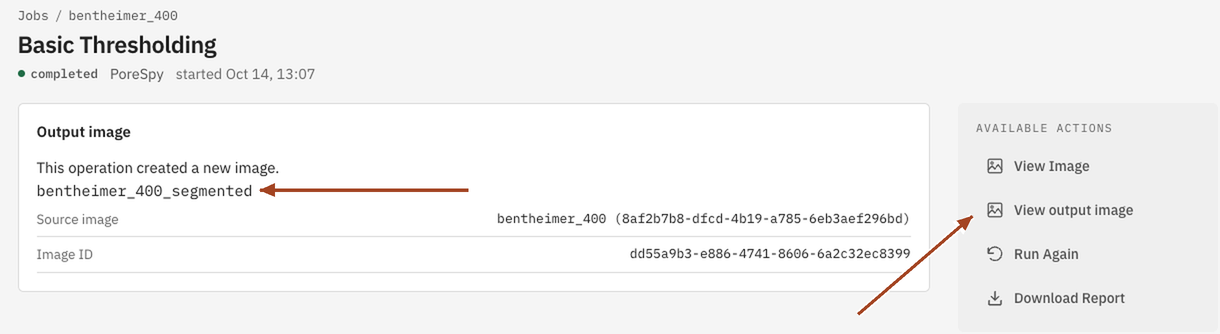
The run thresholds the whole volume and saves a new binary image, pore 1 and solid 0, with the source's size and voxel size. The job's Settings show Invert (keep above threshold) as Yes or No, as you ticked it. The job page shows the Output image with a link to it, and View output image under Available Actions opens it. From there, trim or clean it, or run any analysis on it.
Common problems
- The image isn't in the list. It's already binary, so there's nothing to threshold. Images whose voxels hold only two values count as binary.
- Pore and solid come out swapped. Your pores are brighter than the solid. Tick Invert (keep above threshold) and run again, or swap the phases of the result with Adjust Values.
- Speckles of pore in the solid, or solid in the pores. Thresholding doesn't remove noise. Clean the result, or filter the scan first and threshold the filtered copy.
- Brightness drifts across the scan. One global threshold can't follow it. Try Local (Adaptive), or Interactive Segmentation.
- The full result differs slightly from the preview. The preview picks its threshold from one slice; the run picks it from the whole volume.
Science
How Otsu, Li and the local threshold are computed: Basic Thresholding in the Scientific reference.