Conductivity
Conductivity measures how well the solid skeleton conducts heat or electric current, compared with a block of the same solid with no pores. Use it for the thermal or electronic conductivity of a sintered part, a foam or an electrode's solid network, when the pores insulate.
- Find it Tools › Transport › Conductivity
- Needs a segmented 3D image with a connected solid path along the direction you choose
- Returns the relative conductivity \(\sigma_\text{eff}/\sigma_s\), the solid volume fraction and the solid tortuosity factor, with the potential field
- Runs on GPU, with Tortuosity.jl or TauFactor
- Science Conductivity
Run it
Conductivity is Diffusivity run on the solid instead of the pores, and its form is the same.
- Open Tools, then Transport, and select Conductivity. You can also start from an image's page, which fills in the image for you.
- Under Source, choose the Image, or a batch to run every image in it. Use the image as segmented, pore and solid as they are; PoreStore picks out the solid itself.
- Under Settings, pick the Direction of conduction: X direction, Y direction or Z direction.
- Set the Target accuracy. The suggested
0.001accepts a 0.1% error in the result. - Under Compute, choose the Backend. Leave Compute tier on Auto unless you need a particular GPU.
- Select Run. The job page opens and follows the job until it finishes.
Before the solver starts, PoreStore checks that a connected solid path joins the inlet and outlet faces along your direction. The note under the image tells you when it already knows the image has none, and a job on such an image stops before it runs.
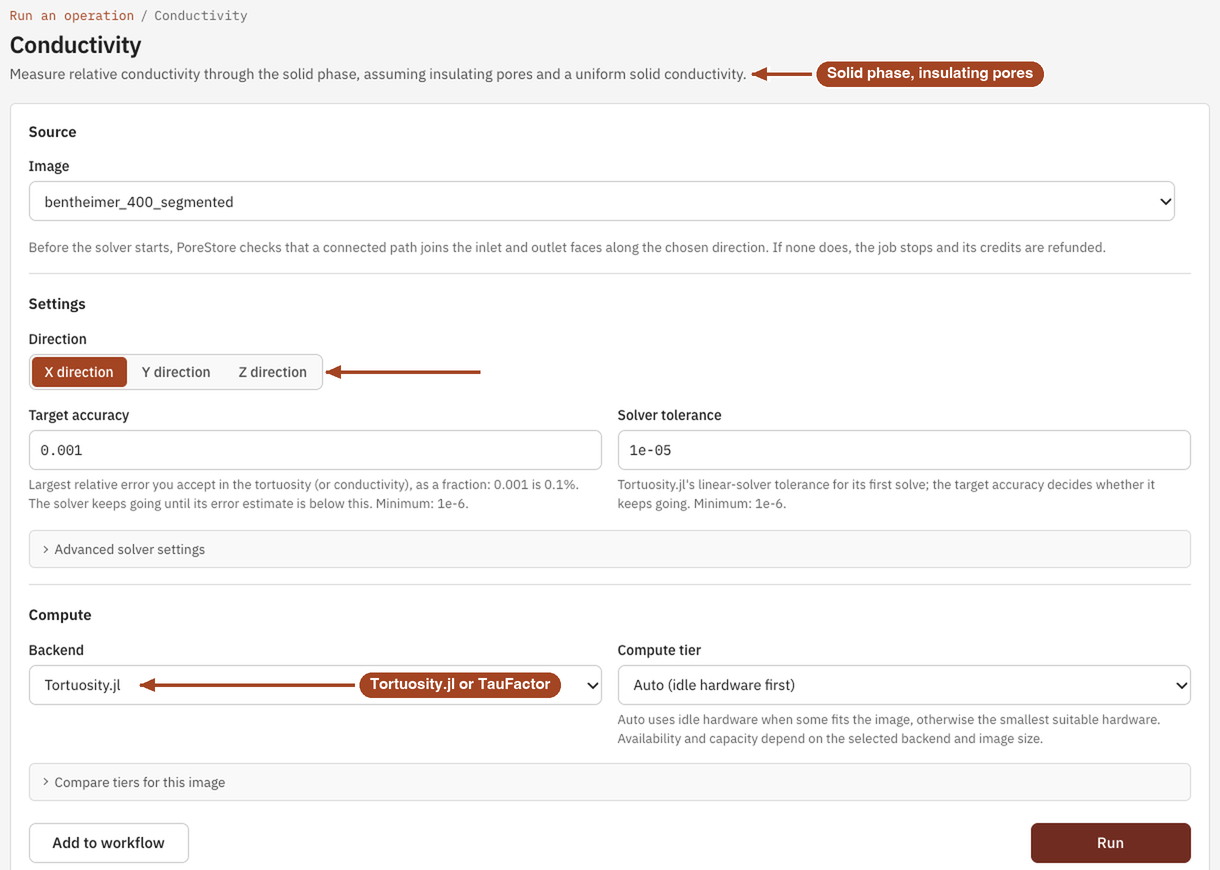
Settings
| Setting | Default | Range | What it does |
|---|---|---|---|
| Image | your team's images and batches | The image to analyse, or a batch to run one job per image. | |
| Direction | X direction | X, Y, Z direction | The axis heat or current flows along. The inlet is the first face along it. |
| Target accuracy | 0.001 |
10⁻⁶ or more | The largest relative error you accept in the conductivity, as a fraction. The solver keeps going until its error estimate is below it. |
| Solver tolerance | 0.00001 |
10⁻⁶ or more | Tortuosity.jl only. How far the first linear solve goes before the target accuracy takes over. |
| Maximum iterations | 10000 |
1–1,000,000 | TauFactor only, under Advanced solver settings. TauFactor stops when it converges or reaches this limit. |
| Backend | Tortuosity.jl | Tortuosity.jl, TauFactor | The solver, the same two as for diffusivity. |
| Compute tier | Auto (idle hardware first) | Auto, or a tier that fits the image | The GPU the job runs on. Every tier gives the same answer. See Compute and hardware. |
Results
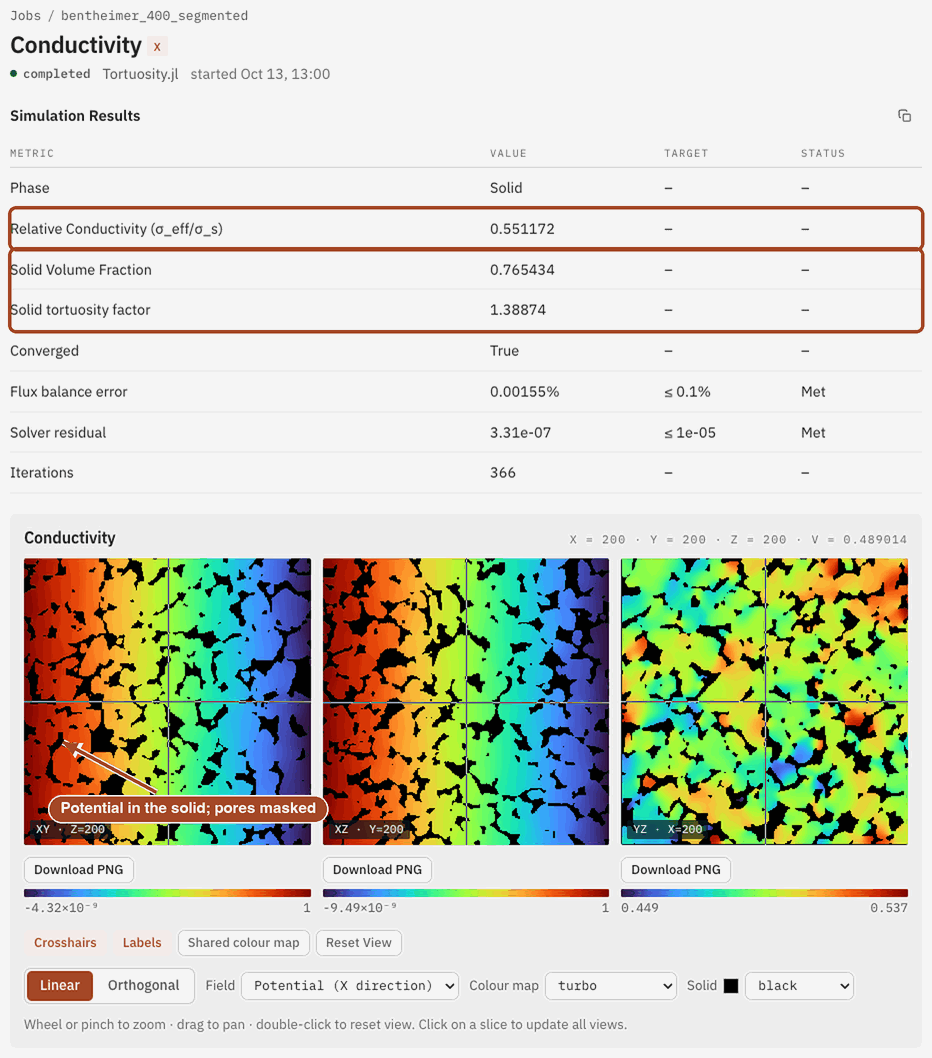
The job page leads with the relative conductivity \(\sigma_\text{eff}/\sigma_s\). Multiply it by the conductivity of your solid to get the material's effective conductivity. Below it, the Simulation Results table lists, with a target and a Met or Missed status for each check:
- Phase: Solid.
- Relative Conductivity (σ_eff/σ_s): conduction through the sample relative to a solid block, solid volume fraction included.
- Solid Volume Fraction: the fraction of the image that is solid, \(1 - \varphi\).
- Solid tortuosity factor: how convoluted the paths through the solid are. Straight solid columns give 1.
- Converged, Flux balance error and Iterations: whether the solver reached your target accuracy, and how much work it took. Tortuosity.jl adds Solver residual.
Under the table, a slice viewer shows the saved potential field through the solid: 1 at the inlet, 0 at the outlet, with the pores masked. A steep drop across a few slices marks a bottleneck in the solid network.
From the job page you can Download Report as PDF or HTML, Download scalar fields to keep the potential field, and Run Again with the same settings, for example in another direction.
Common problems
- The job stops before the solver runs. No connected solid path joins the inlet and outlet along your direction, so nothing can conduct through. Try another direction, or check the segmentation.
- The result looks like the pores, not the solid. Check the segmentation's convention: solid is 0, and pore is the other value. If yours is the other way round, swap them with Adjust Values first.
- Converged is False. Tortuosity.jl stopped short of your target accuracy; the Flux balance error row shows the accuracy it reached. Run it again with a smaller Solver tolerance.
- The job fails with TauFactor. TauFactor didn't converge within Maximum iterations. Raise the limit, loosen the target accuracy, or switch to Tortuosity.jl.
- Your pores conduct. Conductivity assumes insulating pores. For an electrolyte-filled pore space, run Diffusivity instead.
Science
The equation, its boundary conditions and the assumptions to check before you use the result: Conductivity in the Scientific reference.