Radial Density
Radial Density measures how far the pore space lies from the nearest solid: the share of pore volume at each distance from a wall. Use it for anything that depends on wall proximity, such as surface reactions or NMR relaxation, or on the solid to see how thick the walls and grains are.
- Find it Tools › Statistics › Radial Density
- Needs a segmented 3D image, up to 1024³ voxels
- Returns the distribution of distance to the nearest solid, and its median \(r_{50}\)
- Runs on CPU, with PoreSpy
- Science Radial Density
Run it
- Open Tools, then Statistics, and select Radial Density. You can also start from an image's page, which fills in the image for you.
- Under Source, choose the Image, or a batch to run every image in it.
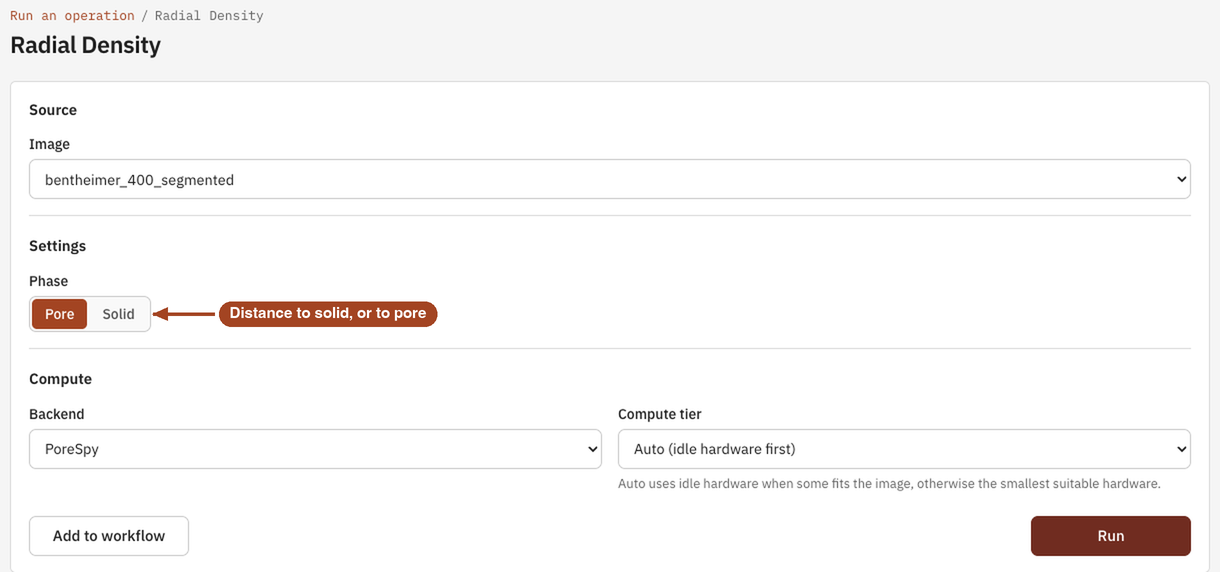
- Under Settings, choose the Phase, Pore or Solid, if your team has the choice. There's nothing else to set: PoreStore chooses the bins.
- Under Compute, the Backend is PoreSpy.
- Select Run. The job page opens and follows the job until it finishes.
Settings
| Setting | Default | Range | What it does |
|---|---|---|---|
| Image | your team's images and batches | The image to analyse, or a batch to run one job per image. | |
| Phase | Pore | Pore, Solid | Pore measures each pore voxel's distance to the solid; Solid measures each solid voxel's distance to the pores. Shown when your team can measure the solid. |
| Backend | PoreSpy | PoreSpy | The software that runs the analysis. |
| Compute tier | Auto | Auto, or a tier your team may use | Shown only when your team can choose the machine. Every tier gives the same answer. See Compute and hardware. |
Results
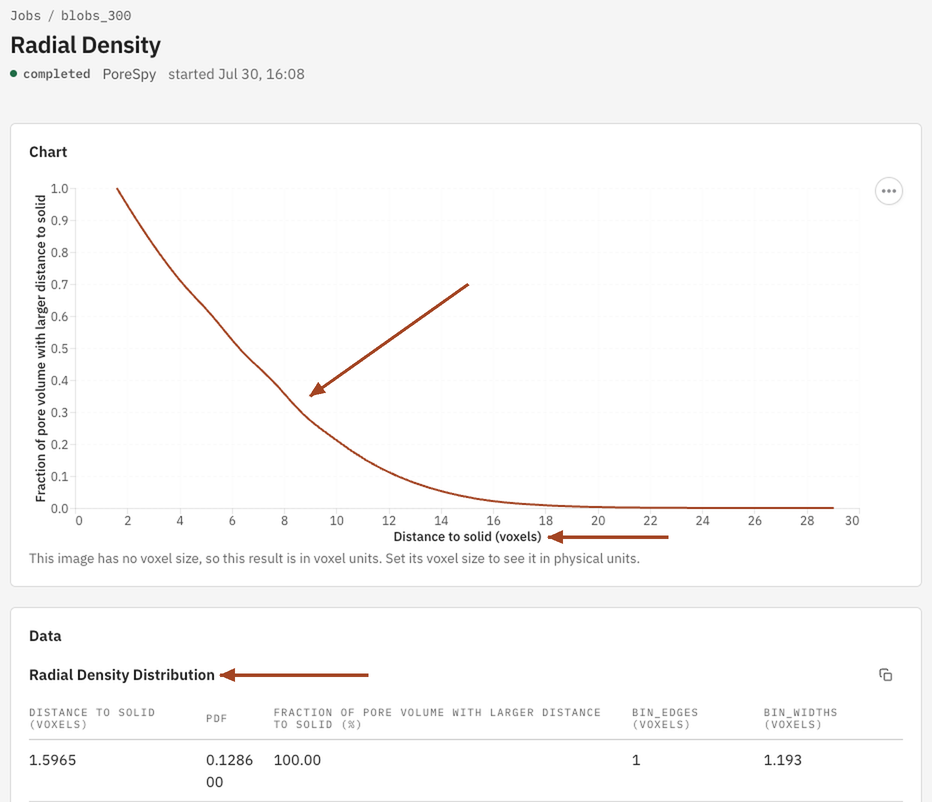
The Jobs list and the report sum the result up as the Median distance to solid \(r_{50}\): half the pore volume lies farther than this from the nearest wall. For the solid phase it's the Median distance to pore. The job page shows:
- Chart: the Fraction of pore volume with larger distance to solid against Distance to solid, in µm once the image has a voxel size and in voxels otherwise. For the solid phase the axes read Distance to pore and Fraction of solid volume with larger distance to pore.
- Data: the Radial Density Distribution table, one row per distance bin, with the columns Distance to solid, PDF, Fraction of pore volume with larger distance to solid (%), Bin edge and Bin width. For the solid phase the first and third read Distance to pore and Fraction of solid volume with larger distance to pore.
From the job page you can Download Report as PDF or HTML and Run Again, for example on the solid.
Every segmented image also gets a quick radial density of its pores when it's uploaded, in voxel units. Download it from the image's page with Radial density CSV.
Common problems
- It looks like Pore Size, but smaller. Radial density gives each point its own distance to the wall; Pore Size gives each point the size of the pore it sits in. A point beside the wall of a big pore is near the solid but in a large pore.
- Distances near the image edge are too large. The image's outer faces don't count as solid, so a pore voxel near an edge can read farther from solid than it is in the whole sample.
- The curve is jagged at short distances. Distances on a voxel grid take only the values 1, √2, √3, 2, …, so the first few bins hold uneven counts.
Science
The definition, how the bins are chosen and how the result relates to surface area and pore size: Radial Density in the Scientific reference.