Network Validation
Network Validation runs single-phase flow and diffusion through a pore network you extracted, and reports the network's permeability and diffusivity. Put them next to the Permeability and Diffusivity of the same image to judge how faithfully the network represents the pore space before you rely on it.
- Find it Tools › Networks › Network Validation
- Needs a completed Network Extraction on the same image
- Returns the network permeability \(k\) and \(D_\text{eff}/D_0\), with the pores and throats left after trimming
- Runs on CPU, with PoreSpy, solved with OpenPNM
- Science Network Validation
Run it
- Open Tools, then Networks, and select Network Validation.
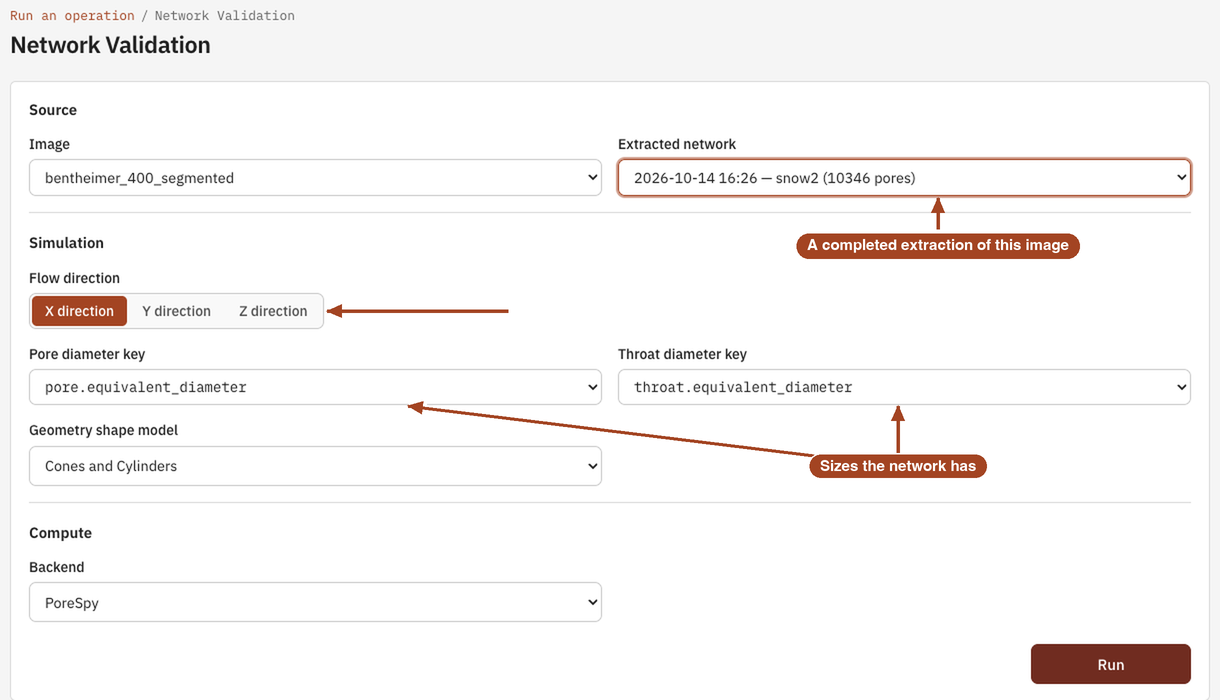
- Under Source, choose the Image. The Extracted network menu then lists that image's completed extractions, each with its date, method and number of pores; choose one.
- Under Simulation, pick the Flow direction: X direction, Y direction or Z direction.
- Choose the Pore diameter key and Throat diameter key. The menus list the diameters the chosen network has.
- Choose the Geometry shape model, or keep Cones and Cylinders.
- Under Compute, leave the Backend on PoreSpy, and select Run.
Validation runs on one image at a time; it can't run on a batch.
Settings
| Setting | Default | Range | What it does |
|---|---|---|---|
| Image | your team's images | The image whose network you validate. | |
| Extracted network | the image's completed network extractions | The network to simulate. | |
| Flow direction | X direction | X direction, Y direction, Z direction | The axis that flow and diffusion run along. |
| Pore diameter key | pore.equivalent_diameter |
the network's pore diameters | Which pore size feeds the conductances. Equivalent diameters conserve each pore's volume; inscribed diameters give smaller conductances. |
| Throat diameter key | throat.equivalent_diameter |
the network's throat diameters | Which throat size feeds the conductances. |
| Geometry shape model | Cones and Cylinders | Spheres and Cylinders, Circles and Rectangles, Cones and Cylinders, Cubes and Cuboids, Pyramids and Cuboids, Squares and Rectangles, Trapezoids and Rectangles, Intersecting Cones, Intersecting Pyramids, N Cylinders in Series | The shape assumed for each pore and throat, which turns a diameter into a conductance. |
| Backend | PoreSpy | PoreSpy | The software that runs the simulation. |
Results
The job page leads with the network permeability \(k\), in millidarcy once the image has a voxel size and in voxel² until then. Below it, a table lists:
- Permeability (k, m²) and Permeability (k, voxel²): the network's permeability.
- Effective Diffusivity (D_eff/D_0): diffusion through the network relative to free fluid, porosity included, like the image-based value.
- Pores (after trim) and Throats (after trim): what's left of the network once isolated and faulty pores and throats are removed.
PoreStore doesn't compare the numbers with the image's for you; run Permeability and Diffusivity in the same direction and compare them yourself.
In progress
Screenshot: a completed Network Validation job page on an image with a voxel size. Arrows to the network permeability headline, the Effective Diffusivity (D_eff/D_0) row and the Pores (after trim) row.
From the job page you can Download Report as PDF or HTML, and Run Again with the same settings, for example with another shape model.
Common problems
- The Extracted network menu is empty. The image has no completed network extraction yet. Run Network Extraction first.
- A diameter key is refused. The network doesn't have that diameter, and no other is substituted: a MAGNET network has equivalent throat diameters only if it was extracted with Compute throat area on. Choose one the menu lists.
- The values are tens of percent off the image's. That's common, and usually comes from the throat size definition. Try another throat diameter key or shape model.
- Many fewer pores after trim. Much of the network was isolated from its largest connected cluster. Check the segmentation, or clean the image before extracting.
Science
The conduit model, how the inlet and outlet pores are chosen, and the shape models: Network Validation in the Scientific reference.