Permeability
Permeability measures how easily a single fluid flows through the connected pore space under a pressure gradient. Use it for the absolute permeability of a rock, a filter, a gas diffusion layer or any porous material you'd otherwise put in a permeameter.
- Find it Tools › Transport › Permeability
- Needs a segmented 3D image with a connected pore path along the flow direction you choose
- Returns the permeability \(k\) in millidarcy and m² (or voxel² without a voxel size), with the pressure and velocity fields
- Runs on GPU, with waLBerla or Kabs Taichi
- Science Permeability
Run it
- Open Tools, then Transport, and select Permeability. You can also start from an image's page, which fills in the image for you.
- Under Source, choose the Image, or a batch to run every image in it.
- Under Settings, pick the Flow direction: X direction, Y direction or Z direction.
- Leave Maximum iterations and the three tolerances at their suggested values unless you need a tighter or a quicker run.
- Under Compute, choose the Backend. Leave Compute tier on Auto unless you need a particular GPU.
- Select Run. The job page opens and follows the job until it finishes.
Before the solver starts, PoreStore checks that a connected pore path joins the inlet and outlet faces along your flow direction. The note under the image tells you when it already knows the image has none, and a job on such an image stops before it runs.
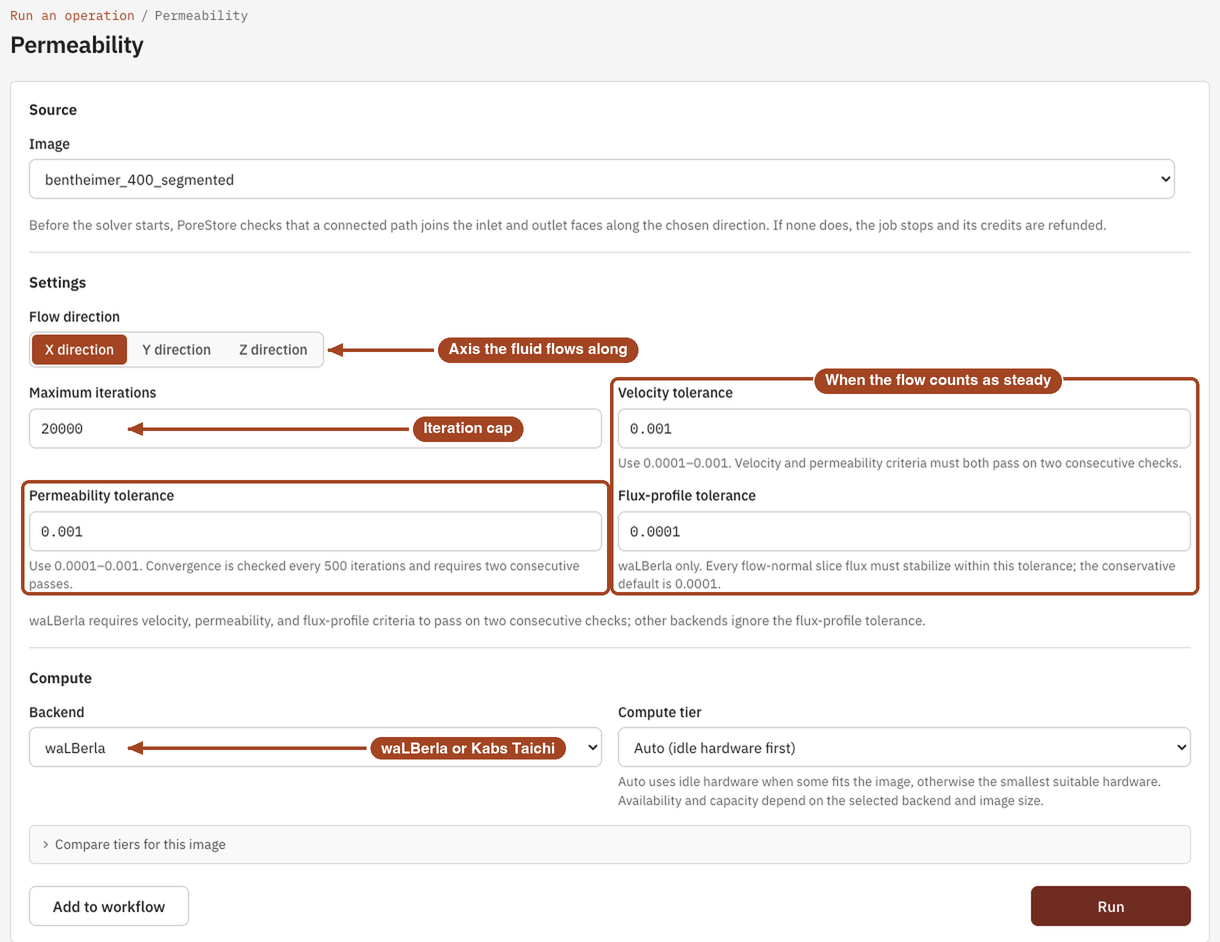
Settings
| Setting | Default | Range | What it does |
|---|---|---|---|
| Image | your team's images and batches | The image to analyse, or a batch to run one job per image. | |
| Flow direction | X direction | X, Y, Z direction | The axis the fluid flows along. The inlet is the first face along it. |
| Maximum iterations | 20000 |
1 or more; waLBerla at most 1,000,000 | The most iterations the solver runs. A run that reaches it still completes, marked not converged. |
| Velocity tolerance | 0.001 |
0.0001–0.001 | How little the velocity field may change between two checks for the flow to count as steady. |
| Permeability tolerance | 0.001 |
0.0001–0.001 | How little \(k\) may change between two checks. Convergence is checked every 500 iterations and needs two passes in a row. |
| Flux-profile tolerance | 0.0001 |
0.0001–0.001 | waLBerla only. How closely the flow rate through every slice across the flow must settle. |
| Backend | waLBerla | waLBerla, Kabs Taichi | The solver. Both simulate the same flow; they impose the pressure and measure its gradient differently, which can shift \(k\) by a few percent. |
| Compute tier | Auto (idle hardware first) | Auto, or a tier that fits the image | The GPU the job runs on. Every tier gives the same answer. See Compute and hardware. |
Staff can also choose the Palabos, Kabs XLB-JAX and Kabs XLB-Warp backends. Palabos runs on a CPU, on a compute tier you name rather than Auto, and checks only the permeability tolerance, every 1000 iterations.
Results
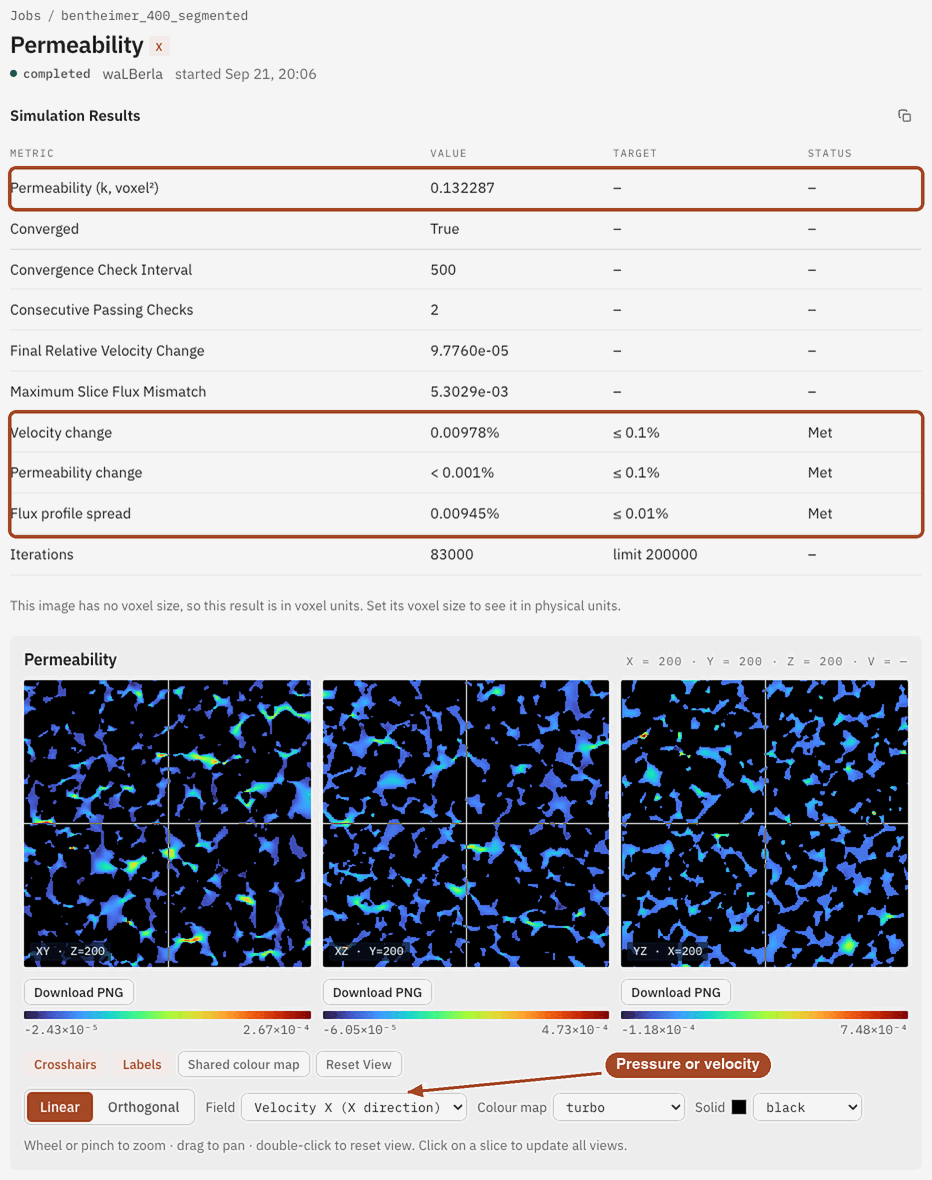
The job page leads with the permeability \(k\) in millidarcy. Without a voxel size it's in voxel², and a note links to the image page where you can set one; the result converts the moment you do, without a rerun. Below it, the Simulation Results table lists, with a target and a Met or Missed status for each check:
- Permeability (k, m²) and Permeability (k, voxel²): the same permeability in physical and in voxel units.
- Converged: whether every check passed on two checks in a row.
- Velocity change, Permeability change and, for waLBerla, Flux profile spread: how far each convergence check got, against the tolerance you set.
- Iterations: how many ran, against your limit.
If part of the pore space was found isolated or dead-end along your direction, a note under the table says how much. It carries no flow, but it still counts in the porosity.
Under the table, a slice viewer shows the saved pressure and velocity fields. Pressure falls from inlet to outlet; the velocity shows which channels carry the flow. For waLBerla, Detailed slice fluxes lists the flow through every slice across the flow direction, which should be the same everywhere in a converged run.
From the job page you can Download Report as PDF or HTML, Download scalar fields to keep the pressure and velocity, and Run Again with the same settings, for example in another direction. Run all three directions to see whether the sample is anisotropic, and open the result in 3D Visualization to see streamlines.
Common problems
- The job stops before the solver runs. No connected pore path joins the inlet and outlet along your flow direction, so nothing can flow through. Try another direction, or check the segmentation.
- Converged is False. The solver reached Maximum iterations before the flow settled. The value of \(k\) may still be close, but check the change rows, then run it again with more iterations.
- waLBerla refuses the iteration count. waLBerla runs at most 1,000,000 iterations.
- Two backends disagree by a few percent. They measure the pressure gradient differently, and short or heterogeneous samples show it most. Pick one backend for a study and say which one you used.
- The value seems too high. The four faces parallel to the flow are periodic, so pores on opposite faces join up. Add a one-voxel layer of solid on those faces before uploading if you want walls, as a sleeved core in a permeameter has.
- \(k\) changes a lot with resolution. Narrow throats only a few voxels wide aren't resolved. Compare with a coarser copy and see resolution and accuracy.
- No compute tier fits. The image is larger than the largest GPU takes: 800³ voxels for waLBerla, which also takes at most 800 slices along the flow, or 1000³ for Kabs Taichi. Trim or downsample it first.
Science
The flow equations, where each backend imposes pressure and measures its gradient, the periodic lateral faces and how convergence is tested: Permeability in the Scientific reference.