REV Porosity
REV Porosity measures the porosity of a thousand randomly placed cubes of different sizes cut from your image. Use it to check whether the image, and the simulations you run on it, are large enough to represent the material rather than one lucky or unlucky corner of it.
- Find it Tools › REV › REV Porosity
- Needs a segmented 3D image, at least 10 voxels along every side and up to 1024³ voxels
- Returns the porosity of each cube against its volume, and the porosity of the largest cubes
- Runs on CPU, with PoreSpy
- Science REV Porosity
Run it
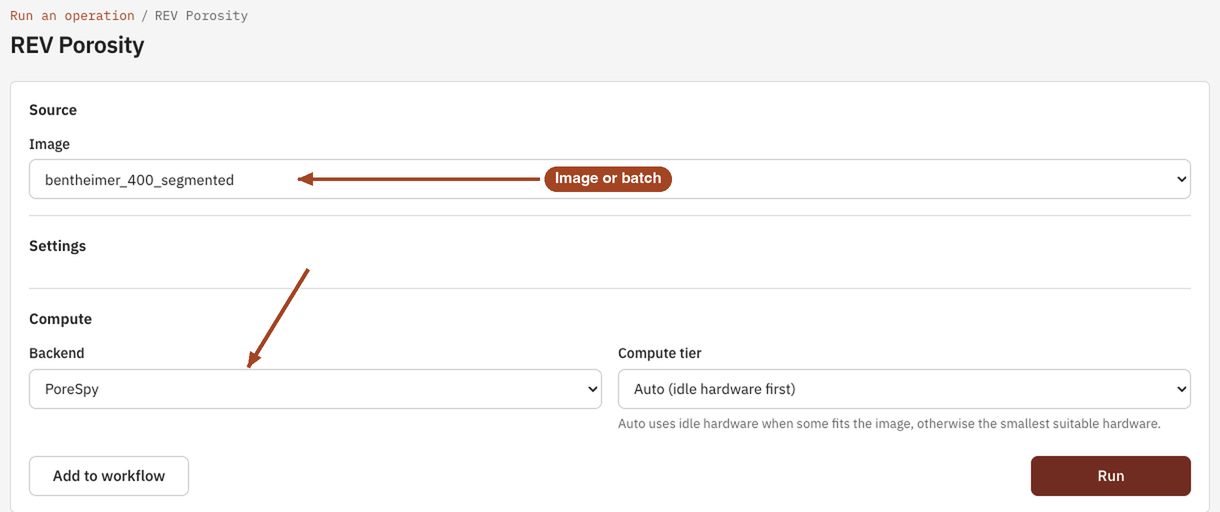
- Open Tools, then REV, and select REV Porosity. You can also start from an image's page, which fills in the image for you.
- Under Source, choose the Image, or a batch to run every image in it.
- Under Compute, leave the Backend on PoreSpy.
- Select Run. The job page opens and follows the job until it finishes.
Settings
| Setting | Default | Range | What it does |
|---|---|---|---|
| Image | your team's images and batches | The image to analyse, or a batch to run one job per image. | |
| Backend | PoreSpy | PoreSpy | The software that runs the analysis. |
The number of cubes (1000) and their sizes (10 to 100 voxels along a side, or the image's shortest side if that's smaller) are fixed.
Results
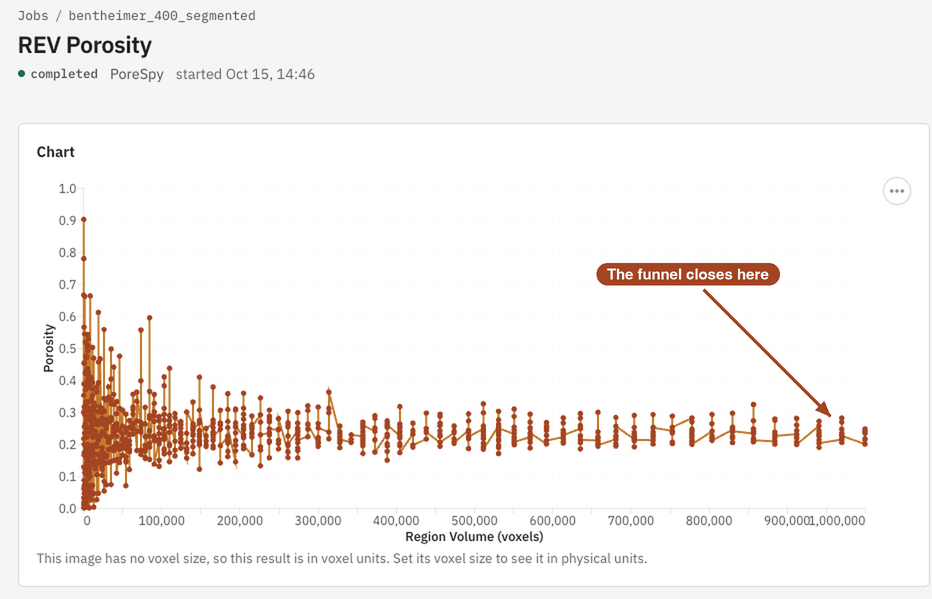
The Jobs list and the report sum the result up as the porosity of the largest regions, \(\varphi\): the mean porosity of the largest tenth of the cubes. The job page shows:
- Chart: Porosity against Region Volume, one point per cube. Small cubes scatter widely; the scatter narrows towards the whole image's porosity as the cubes grow.
- Data: the REV Porosity table, with each cube's Region Volume and Porosity.
Region volumes are in µm³ once the image has a voxel size, and in voxels until then.
From the job page you can Download Report as PDF or HTML, and Run Again.
Common problems
- The funnel never closes. The whole image is smaller than the representative volume for porosity, so results from it describe this sample, not the material. Use a larger image if you have one.
- Two runs on the same image differ. The cubes are placed at random each time, so the points differ while their spread stays the same.
- The job fails at once. The image is thinner than 10 voxels along some side.
- The chart only shows small cubes. Cubes stop at 100 voxels along a side, so on a large image the chart shows only the small-scale end.
Science
What a representative elementary volume is, how the cubes are drawn, and why transport needs larger samples than porosity: REV Porosity in the Scientific reference.