Interfacial Surface Area
Interfacial Surface Area measures the area of the boundary between pore and solid, and that area per unit volume of sample. Use it for reaction rates, adsorption capacity or a Kozeny–Carman prediction of permeability.
- Find it Tools › Structure › Interfacial Surface Area
- Needs a segmented 3D image, at least 2 voxels along each axis and up to 1024³ voxels
- Returns the raw and smoothed interface area, area / bulk volume, and how the area changes over ten smoothing iterations
- Runs on CPU, with PoreSpy
- Science Interfacial Surface Area
In progress
Its accuracy against shapes of known area is still being checked.
Run it
- Open Tools, then Structure, and select Interfacial Surface Area. You can also start from an image's page, which fills in the image for you.
- Under Source, choose the Image. This tool runs on one image at a time, not on a batch.
- Under Settings, tick Remove isolated interior voxels before analysis if your team has the option and you want single-voxel noise left out of the area.
- Under Compute, the Backend is PoreSpy.
- Select Run. The job page opens and follows the job until it finishes.
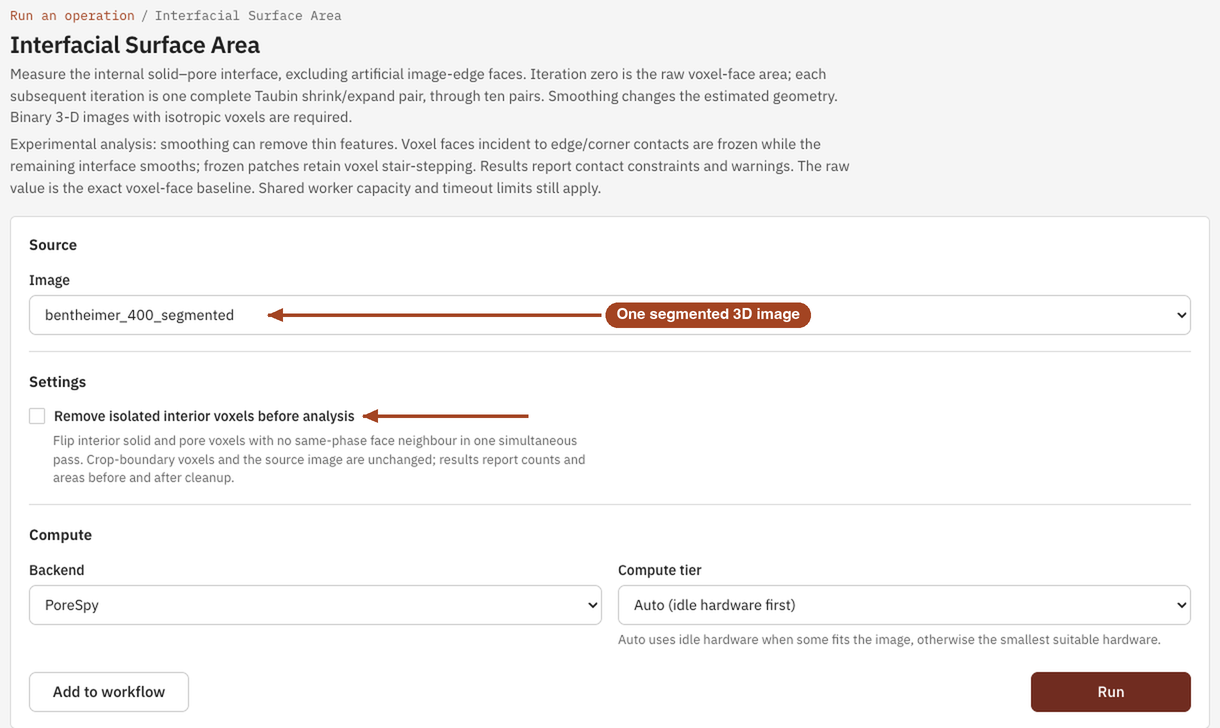
Settings
| Setting | Default | Range | What it does |
|---|---|---|---|
| Image | your team's segmented 3D images | The image to measure. | |
| Remove isolated interior voxels before analysis | off | on, off | Before measuring, flips every voxel with no face neighbour of its own phase, on a working copy. Voxels on the image's outer layer, and your stored image, are left alone. Shown when your team has the option. |
| Backend | PoreSpy | PoreSpy | The software that runs the analysis. |
| Compute tier | Auto | Auto, or a tier your team may use | Shown only when your team can choose the machine. Every tier gives the same answer. See Compute and hardware. |
The smoothing itself, ten iterations with fixed factors, isn't a setting.
Results
This tool has no single summary figure. The job page shows:
- Interfacial surface area: the Raw internal area (the area of the voxel faces between pore and solid), the Final smoothed area, the Final area / bulk volume, and the Final relative change between them. With cleanup on, it also lists the Original raw area before cleanup.
- Chart: the Internal area after each Smoothing iteration, from iteration 0, the raw area, to iteration 10.
- Data: the Area versus smoothing iteration table, with the area, area / bulk volume and relative change at each iteration, and, when they apply, Isolated voxel cleanup and Contact pinning tables.
- Experimental topology warning notes, when parts of the surface meet only along a voxel edge or at a corner.
Areas are in µm² and area / bulk volume in µm⁻¹ once the image has a voxel size, and in voxel units otherwise. Divide area / bulk volume by the porosity for area per unit pore volume.
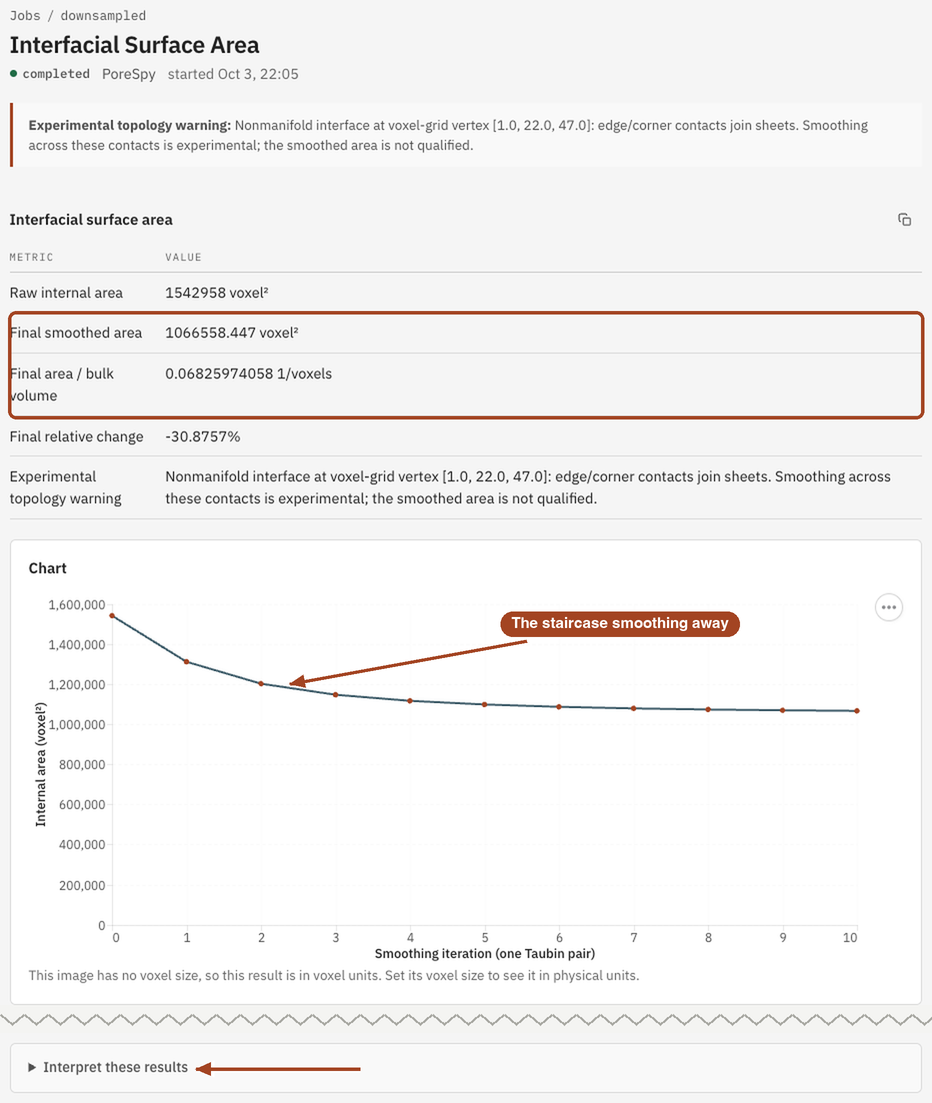
From the job page you can Download Report as PDF or HTML and Run Again.
Common problems
- The image is refused. It must be a segmented 3D image, with at least 2 voxels along each axis, and finished uploading.
- The smoothed area is about a third lower than the raw area. That's expected: a staircase of voxel faces overstates a smooth surface by about half again, and smoothing removes that excess.
- Experimental topology warnings. Some pores or grains touch only along a voxel edge or at a corner. The faces there are held fixed while the rest smooths, so they keep their staircase area. The more of them the result reports, the closer the smoothed area stays to the raw one.
- Thin features disappear. Smoothing can shrink features only a voxel or two thick. Compare the raw and final areas before relying on a thin-walled sample.
Science
Why voxel faces overstate area, how the surface is meshed and smoothed, and how to check the result: Interfacial Surface Area in the Scientific reference.