Mercury Porosimetry
Mercury Porosimetry simulates a mercury intrusion test on your image: mercury is pushed in at rising pressure, then the pressure is lowered again. Use it to compare an image with a lab porosimetry curve, or to read the sizes of the pore entries (throats) that control access to the pore space.
- Find it Tools › Multiphase › Mercury Porosimetry
- Needs a segmented 3D image, up to 900³ voxels
- Returns intrusion and extrusion curves of capillary pressure against mercury saturation, the pressure at half saturation, and maps of where and when mercury entered
- Runs on CPU, with PoreSpy
- Science Mercury Porosimetry
Run it
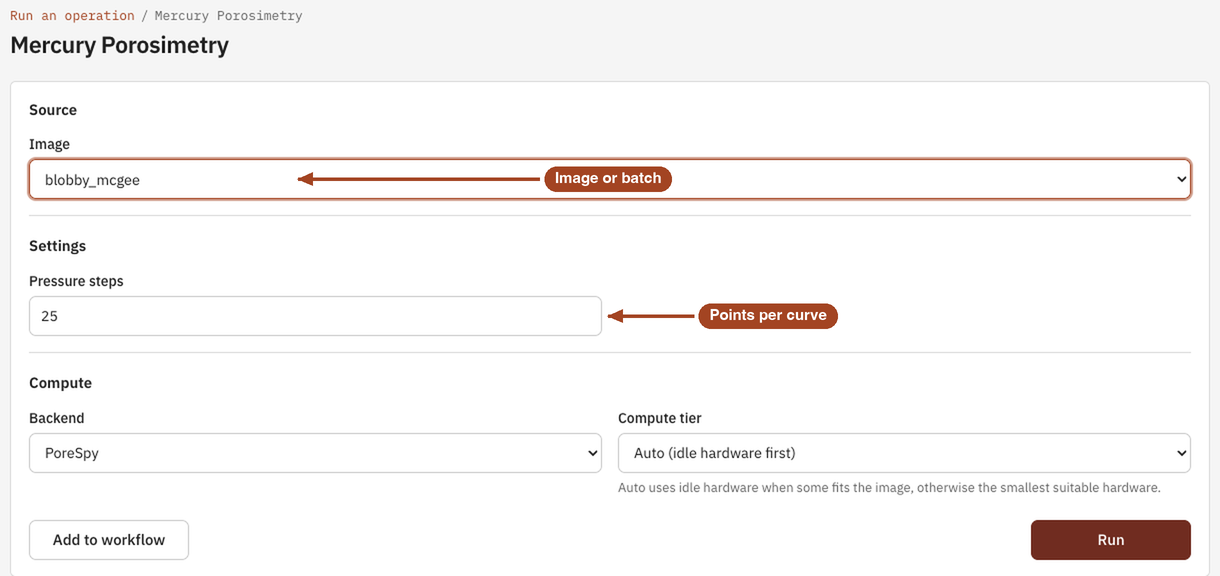
- Open Tools, then Multiphase, and select Mercury Porosimetry. You can also start from an image's page, which fills in the image for you.
- Under Source, choose the Image, or a batch to run every image in it.
- Under Settings, set the number of Pressure steps. The suggested 25 gives a smooth curve for most samples.
- Under Compute, leave the Backend on PoreSpy.
- Select Run. The job page opens and follows the job until it finishes.
Settings
| Setting | Default | Range | What it does |
|---|---|---|---|
| Image | your team's images and batches | The image to analyse, or a batch to run one job per image. | |
| Pressure steps | 25 | 2 or more | How many pressures each curve is computed at. Only steps that push mercury into new pores add a point, so a curve can have fewer points than this. |
| Backend | PoreSpy | PoreSpy | The software that runs the simulation. |
Mercury's surface tension (0.465 N/m) and contact angle (140°) are the standard values for the test and can't be changed.
Results
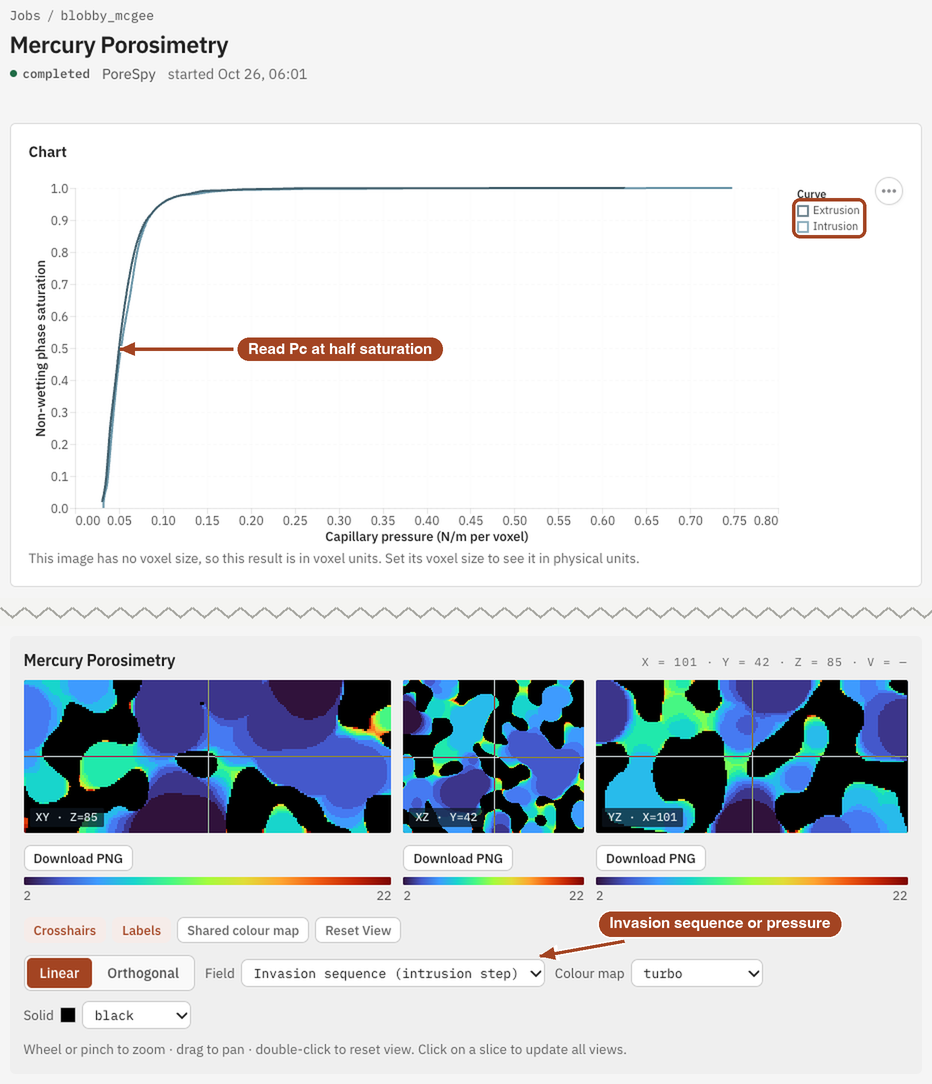
The Jobs list and the report sum the result up as the pressure at half saturation, \(P_{c50}\): the intrusion pressure at which mercury fills half the pore space. The job page shows:
- Chart: Capillary pressure against Non-wetting phase saturation, with an Intrusion curve as the pressure rises and an Extrusion curve as it falls.
- Data: the Mercury Intrusion/Extrusion Curves table, with Pc Intrusion, Snwp Intrusion, Pc Extrusion and Snwp Extrusion at every step.
- Fields: a slice viewer with two maps of the intrusion, Invasion sequence (intrusion step), the step at which mercury first reached each voxel, and Invasion pressure (N/m per voxel), the pressure at which it did.
Pressures are in pascals once the image has a voxel size, and in N/m per voxel until then. See Images to set the voxel size; the result updates without a rerun.
From the job page you can Download Report as PDF or HTML, Download scalar fields to keep the two invasion maps, and Run Again with the same settings.
Common problems
- The extrusion curve doesn't return to zero. That's expected: mercury cut off from every face stays trapped, as in the lab.
- The curve stops at a lower saturation or higher pressure than a lab test. The simulation sees only the pores in the image; pores smaller than a voxel, and compression of the sample, aren't in it.
- Fewer points than Pressure steps. Steps that push no mercury into new pores are left out. Raise Pressure steps for a finer curve.
- Pressures look far too small. The image has no voxel size, so pressures are in N/m per voxel. Set the voxel size on the image's page.
- The image is too large. The largest image is 900³ voxels. Trim or downsample it first.
Science
The Washburn equation, how the morphological method builds intrusion and extrusion, and how to read entry sizes from the curve: Mercury Porosimetry in the Scientific reference.